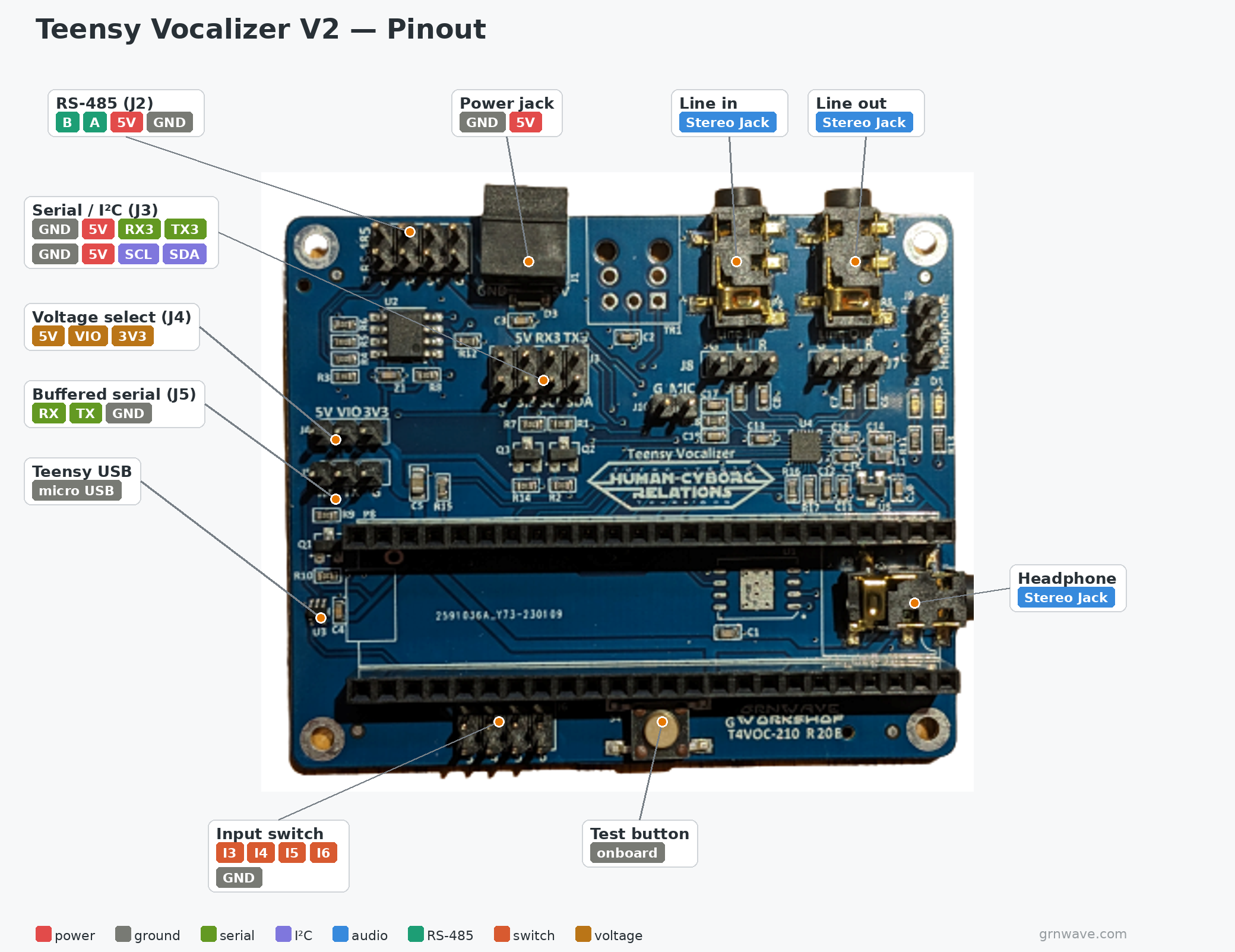
The Grnwave Workshop Vocalizer board is a hardware platform for the embedded version of the humancyborgrelations.com vocalizer. It lets the vocalizer integrate with various control systems to provide audio vocalizations and WAV file playback for your droid — without needing a phone-based application.
This guide covers how to use the hardware. For the full vocalizer user guide, see the Human Cyborg Relations R2-D2 vocalizer documentation.
The V2 board integrates the audio codec directly, eliminating the need for a separate Teensy Audio Board. (A V3 board is also available; this guide will be updated for V3.)
Specifications
Power input: 4.75–5.25 V (5 V nominal). Power the vocalizer from the same supply as your controller so all supplies turn on together. This board supports 5 V power input only.
Interfaces
- USB port — debug messages and programming.
- Buffered serial port (J5) — primary serial port; I/O voltage set by the Voltage Select jumper (J4).
- I²C (header J3) — I²C communication port; I/O voltage set by the Voltage Select jumper (J4).
- Serial Port 3 (J3) — a 3.3 V-only supplemental serial port; not typically used.
- RS-485 (J2) — RS-485 port for multi-drop serial applications. The 10-pin header allows in/out cabling with 5 V support, so the board can be powered and communicate over one cable.
- Line-out audio jack — primary audio output to your amplifier of choice. Requires a standard 3.5 mm stereo audio cable.
- Line-in — not currently supported in software.
- Optical audio jack — for a future optical digital-audio link to an external DAC/amplifier; not currently supported.
- Power jack — two-pin 3.81 mm pluggable terminal block. Connect to a stable 5 V input.
- Power connector header: Molex 0395121002 or equivalent.
- Mating plug: Molex 0395100002 or equivalent.
- Input switch header — 4 connections for open-to-ground switches, for discrete triggering of vocalizations in a stand-alone setup where the controller has no serial communications. The on-board button can also trigger a vocalization manually — handy during setup to confirm sounds work without a controller attached.
- Teensy microSD card socket — stores all WAV files (not MP3) for playback. A fast card is needed for smooth playback; see the SD card setup instructions.
Board connection overview